Sabtu, 09 Mei 2020

1920.835 Jobsheet 1105

<div dir="ltr" style="text-align: left;" trbidi="on">
<div style="text-align: center;">
</div>
<div style="text-align: center;">
<br /></div>
<div dir="ltr" trbidi="on">
<div style="text-align: center;">
<span style="font-family: &quot;trebuchet ms&quot; , sans-serif; font-size: large;"><b>JOB SHEET</b></span><br />
<span style="font-family: &quot;trebuchet ms&quot; , sans-serif; font-size: large;"><b>SMK TUNAS HARAPAN PATI</b></span></div>
<div style="text-align: center;">
<br /></div>
<div style="text-align: center;">
<br /></div>
<table border="1" style="text-align: center; width: 666px;">
<tbody>
<tr>
<td border="1" style="text-align: center; width: 220px;"><b><span style="font-family: &quot;trebuchet ms&quot; , sans-serif;">Program Keahlian</span></b></td>
<td border="1" style="text-align: center; width: 220px;"><b><span style="font-family: &quot;trebuchet ms&quot; , sans-serif;">Mata Pelajaran</span></b></td>
<td border="1" style="text-align: center; width: 220px;"><b><span style="font-family: &quot;trebuchet ms&quot; , sans-serif;">Kode Mata Pelajaran</span></b></td>
</tr>
<tr>
<td border="1" style="text-align: center; width: 220px;"><span style="font-family: &quot;trebuchet ms&quot; , sans-serif;">Teknik Komputer dan Jaringan</span></td>
<td border="1" style="text-align: center; width: 220px;"><span style="font-family: &quot;trebuchet ms&quot; , sans-serif;">Administrasi Sistem Jaringan</span></td>
<td border="1" style="text-align: center; width: 220px;"><span style="font-family: &quot;trebuchet ms&quot; , sans-serif;">11.05/ASJ/1920</span></td>
</tr>
<tr>
<td border="1" style="text-align: center; width: 220px;"><b><span style="font-family: &quot;trebuchet ms&quot; , sans-serif;">Tingkat / Kelas</span></b></td>
<td border="1" style="text-align: center; width: 220px;"><b><span style="font-family: &quot;trebuchet ms&quot; , sans-serif;">Materi Pokok</span></b></td>
<td border="1" style="text-align: center; width: 220px;"><b><span style="font-family: &quot;trebuchet ms&quot; , sans-serif;">Waktu Pembelajaran</span></b></td>
</tr>
<tr>
<td border="1" style="text-align: center; width: 220px;"><span style="font-family: &quot;trebuchet ms&quot; , sans-serif;">XI TKJ 1 2 3 4</span></td>
<td border="1" style="text-align: center; width: 220px;"><table class="NormalTable" style="text-align: center;"><tbody>
<tr><td width="200"><span class="fontstyle0"><span style="font-family: &quot;trebuchet ms&quot; , sans-serif;">Menguji hasil instalasi Sistem&nbsp;Operasi Jaringan</span></span></td></tr>
</tbody></table>
</td>
<td border="1" style="text-align: center; width: 220px;"><span style="font-family: &quot;trebuchet ms&quot; , sans-serif;">6 x 45 Menit</span></td>
</tr>
<tr>
<td border="1" rowspan="4" style="text-align: center; width: 220px;"><div class="separator" style="clear: both; text-align: center;">
</div>
<div class="separator" style="clear: both; text-align: center;">
</div>
<div class="separator" style="clear: both; text-align: center;">
</div>
<b><span style="font-family: &quot;trebuchet ms&quot; , sans-serif;"></span></b></td>

<td border="1" style="text-align: center; width: 220px;"><b><span style="font-family: &quot;trebuchet ms&quot; , sans-serif;">Nama Jobsheet</span></b></td>

<td border="1" style="text-align: center; width: 220px;"><b><span style="font-family: &quot;trebuchet ms&quot; , sans-serif;">Tanggal Praktikum</span></b></td>
</tr>
<tr>
<td border="1" style="text-align: center; width: 220px;"><table class="NormalTable"><tbody>
<tr><td width="200"><div style="text-align: center;">
<span class="fontstyle0">Manajemen File</span></div>
</td></tr>
</tbody></table>
</td>
<td border="1" style="text-align: center; width: 220px;"><span style="font-family: &quot;trebuchet ms&quot; , sans-serif;">September 2019</span></td>
</tr>
<tr>
<td border="1" style="text-align: center; width: 220px;"><b><span style="font-family: &quot;trebuchet ms&quot; , sans-serif;">Nama : Tegar Yusuf F.R</span></b></td>
<td border="1" style="text-align: center; width: 220px;"><b><span style="font-family: &quot;trebuchet ms&quot; , sans-serif;">Kode Score</span></b></td>
</tr>
<tr>
<td border="1" style="text-align: center; width: 220px;"><div style="text-align: left;">
<div style="text-align: center;">
<br /></div>
</div>
</td>
<td border="1" style="text-align: center; width: 220px;"><br /></td>
</tr>
</tbody></table>
<div style="text-align: center;">
<br /></div>
<div style="text-align: justify;">
<div style="text-align: center;">
<span style="font-family: &quot;trebuchet ms&quot; , sans-serif;"><span style="color: blue; font-size: large;"><br /></span></span></div>
<div style="text-align: left;">
<span style="font-family: &quot;trebuchet ms&quot; , sans-serif;"><span style="color: blue; font-size: large;">I. TUJUAN</span></span></div>
</div>
<blockquote class="tr_bq">
<span style="font-family: &quot;trebuchet ms&quot; , sans-serif;">1. Siswa mengenal Sistem Operasi Jaringan Berbasis CLI</span></blockquote>
<blockquote class="tr_bq">
<span style="font-family: &quot;trebuchet ms&quot; , sans-serif;">2. Siswa mengenal Manajemen File dalam Linux Debian</span></blockquote>
<blockquote class="tr_bq">
<span style="font-family: &quot;trebuchet ms&quot; , sans-serif;">3. Siswa mengenal Hak Akses sebuah File</span></blockquote>
<blockquote class="tr_bq">
<span style="font-family: &quot;trebuchet ms&quot; , sans-serif;">4. Siswa&nbsp;</span><span style="font-family: &quot;trebuchet ms&quot; , sans-serif;">mampu mengubah Hak Akses&nbsp;</span><br />
<!--more--></blockquote>
<blockquote class="tr_bq">
<br /></blockquote>
<span style="color: blue; font-family: &quot;trebuchet ms&quot; , sans-serif; font-size: large;">II. ALAT DAN BAHAN</span><br />
<blockquote class="tr_bq">
<span style="font-family: &quot;trebuchet ms&quot; , sans-serif;">1. LCD Proyektor</span></blockquote>
<blockquote class="tr_bq">
<span style="font-family: &quot;trebuchet ms&quot; , sans-serif;">2. PC atau Laptop yang telah terinstal Windows 7, Windows 8 atau Windows 10</span></blockquote>
<blockquote class="tr_bq">
<span style="font-family: &quot;trebuchet ms&quot; , sans-serif;">3. Panduan Manajemen File dalam Linux Debian</span></blockquote>
<br />
<div style="text-align: left;">
<span style="color: blue; font-family: &quot;trebuchet ms&quot; , sans-serif; font-size: large;">III. KESELAMATAN KERJA</span></div>
<blockquote class="tr_bq" style="text-align: justify;">
<div style="text-align: left;">
<span style="font-family: &quot;trebuchet ms&quot; , sans-serif;">1. Menghidupkan PC atau Laptop sesuai dengan aturan yang telah ditetapkan</span></div>
</blockquote>
<blockquote class="tr_bq" style="text-align: justify;">
<div style="text-align: left;">
<span style="font-family: &quot;trebuchet ms&quot; , sans-serif;">2. Mengatur kabel power serapi mungkin</span></div>
</blockquote>
<blockquote class="tr_bq" style="text-align: justify;">
<div style="text-align: left;">
<span style="font-family: &quot;trebuchet ms&quot; , sans-serif;">3. Menggunakan kaca mata pelindung radiasi</span></div>
</blockquote>
<blockquote class="tr_bq" style="text-align: justify;">
<div style="text-align: left;">
<span style="font-family: &quot;trebuchet ms&quot; , sans-serif;">4. Menggunakan screen monitor untuk keamanan data</span></div>
</blockquote>
<blockquote class="tr_bq" style="text-align: justify;">
<div style="text-align: left;">
<span style="font-family: &quot;trebuchet ms&quot; , sans-serif;">5. Membackup data data penting ke memori eksternal</span></div>
</blockquote>
<blockquote class="tr_bq" style="text-align: justify;">
<div style="text-align: left;">
<span style="font-family: &quot;trebuchet ms&quot; , sans-serif;">6. Mematikan komputer sesuai dengan aturan yang telah ditetapkan</span></div>
</blockquote>
<div style="text-align: left;">
<br /></div>
<div style="text-align: justify;">
<div style="text-align: left;">
<span style="color: blue; font-family: &quot;trebuchet ms&quot; , sans-serif; font-size: large;">IV. LANGKAH KERJA</span></div>
</div>
<br />
<blockquote class="tr_bq" style="text-align: justify;">
<span style="font-family: &quot;trebuchet ms&quot; , sans-serif;">1. Buka software Debian sehingga keluar prompt :</span></blockquote>
<div style="text-align: center;">
<span style="font-family: &quot;trebuchet ms&quot; , sans-serif;"><i><span style="color: red; font-size: medium;">tegar</span></i><i><span style="color: blue; font-size: medium;">&nbsp;login:</span></i></span></div>
<blockquote class="tr_bq" style="text-align: justify;">
<span style="font-family: &quot;trebuchet ms&quot; , sans-serif;">2.Masuk ke user root dengan mengetik root dan passwordnya</span></blockquote>
<blockquote class="tr_bq" style="text-align: center;">
<i style="font-family: &quot;trebuchet ms&quot;, sans-serif;"><span style="color: red; font-size: medium;">tegar login&nbsp;</span></i><i style="font-family: &quot;trebuchet ms&quot;, sans-serif;"><span style="color: blue; font-size: medium;">: </span><span style="color: red; font-size: medium;">root</span></i></blockquote>
<blockquote class="tr_bq" style="text-align: center;">
<span style="font-family: &quot;trebuchet ms&quot; , sans-serif;">password : <i><span style="color: red; font-size: medium;">123</span></i></span></blockquote>
<blockquote class="tr_bq" style="text-align: justify;">
<span style="font-family: &quot;trebuchet ms&quot; , sans-serif;">&nbsp; &nbsp; &nbsp;sehingga keluar user root sebagai berikut :</span></blockquote>
<blockquote class="tr_bq" style="text-align: center;">
<span style="font-family: &quot;trebuchet ms&quot; , sans-serif;"><i><span style="color: blue; font-size: medium;">root@</span></i><i><span style="color: red; font-size: medium;">tegar</span></i><i><span style="color: blue; font-size: medium;">&nbsp;:~#</span><span style="color: red; font-size: medium;">&nbsp;</span></i></span></blockquote>
<blockquote class="tr_bq" style="text-align: justify;">
<span style="font-family: &quot;trebuchet ms&quot; , sans-serif;">3. Masuk ke user Home dengan mengetik :</span></blockquote>
<blockquote class="tr_bq" style="text-align: center;">
<span style="font-family: &quot;trebuchet ms&quot; , sans-serif;"><i><span style="color: blue; font-size: medium;">root@</span></i><i><span style="color: red; font-size: medium;">tegar</span></i><i><span style="color: blue; font-size: medium;">&nbsp;:~# </span><span style="color: red; font-size: medium;"> cd /home</span></i></span></blockquote>
<div style="text-align: center;">
<span style="font-family: &quot;trebuchet ms&quot; , sans-serif;"><i><span style="color: blue; font-size: medium;">root@</span></i><i><span style="color: red; font-size: medium;">tegar</span></i><i><span style="color: blue; font-size: medium;">&nbsp;:/home #</span><span style="color: red; font-size: medium;">&nbsp;</span></i></span></div>
<blockquote class="tr_bq" style="text-align: justify;">
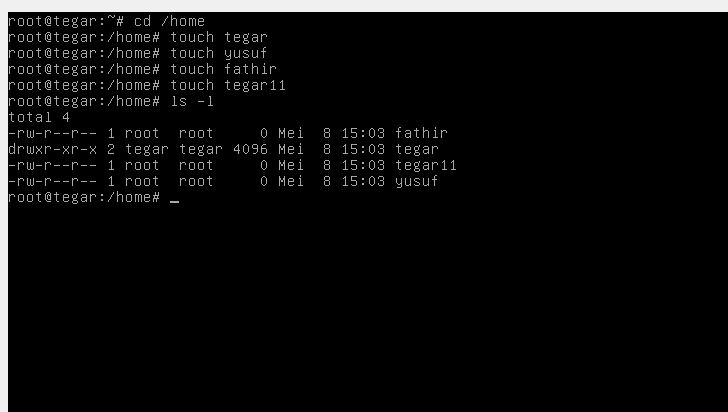
<span style="font-family: &quot;trebuchet ms&quot; , sans-serif;">4. Buat 4 file kosong dengan perintah touch</span></blockquote>
<div style="text-align: center;">
<span style="font-family: &quot;trebuchet ms&quot; , sans-serif;"><i><span style="color: blue; font-size: medium;">root@</span></i><i><span style="color: red; font-size: medium;">tegar</span></i><i><span style="color: blue; font-size: medium;">&nbsp;:/home #</span><span style="color: red; font-size: medium;">  touch zaenal</span></i></span></div>
<div style="text-align: center;">
<span style="font-family: &quot;trebuchet ms&quot; , sans-serif;"><i><span style="color: blue; font-size: medium;">root@</span></i><i><span style="color: red; font-size: medium;">tegar</span></i><i><span style="color: blue; font-size: medium;">&nbsp;:/home #</span><span style="color: red; font-size: medium;">  touch yudi</span></i></span></div>
<div style="text-align: center;">
<span style="font-family: &quot;trebuchet ms&quot; , sans-serif;"><i><span style="color: blue; font-size: medium;">root@</span></i><i><span style="color: red; font-size: medium;">tegar</span></i><i><span style="color: blue; font-size: medium;">&nbsp;:/home # </span><span style="color: red; font-size: medium;"> touch yumanto</span></i></span></div>
<div style="text-align: center;">
<span style="font-family: &quot;trebuchet ms&quot; , sans-serif;"><i><span style="color: blue; font-size: medium;">root@</span></i><i><span style="color: red; font-size: medium;">tegar</span></i><i><span style="color: blue; font-size: medium;">&nbsp;:/home # </span><span style="color: red; font-size: medium;"> touch wahyudin</span></i></span></div>
<div style="text-align: justify;">
<span style="font-family: &quot;trebuchet ms&quot; , sans-serif;"><br /></span></div>
<div style="text-align: justify;">
<span style="font-family: &quot;trebuchet ms&quot; , sans-serif;">5. Lihat file file tersebut dengan perintah ls -l</span></div>
<div style="text-align: center;">
<span style="font-family: &quot;trebuchet ms&quot; , sans-serif;"><i><span style="color: blue; font-size: medium;">root@</span></i><i><span style="color: red; font-size: medium;">tegar</span></i><i><span style="color: blue; font-size: medium;">&nbsp;:/home # </span><span style="color: red; font-size: medium;"> ls -l</span></i></span></div>
<br />
<div class="separator" style="clear: both; text-align: center;">
<br /></div>
<div class="separator" style="clear: both; text-align: center;">
</div>
<div class="separator" style="clear: both; text-align: center;">
</div>
<div class="separator" style="clear: both;">
</div>
<div style="text-align: justify;">
<span style="font-family: &quot;trebuchet ms&quot; , sans-serif;"><br /></span></div>
<blockquote class="tr_bq" style="text-align: justify;">
<span style="font-family: &quot;trebuchet ms&quot; , sans-serif;">akan muncul file file di atas sebagai berikut :</span></blockquote>
<blockquote class="tr_bq" style="text-align: justify;">
<span style="font-family: &quot;trebuchet ms&quot; , sans-serif;"><span style="color: red; font-size: medium;"><i>-rw-r--r-- 1 root root 0 mar 2 16:56 wahyudin</i></span></span></blockquote>
<blockquote class="tr_bq" style="text-align: justify;">
<span style="font-family: &quot;trebuchet ms&quot; , sans-serif;"><span style="color: red; font-size: medium;"><i>-rw-r--r-- 1 root root 0 mar 2 16:56 yudi&nbsp;</i></span></span></blockquote>
<blockquote class="tr_bq" style="text-align: justify;">
<span style="font-family: &quot;trebuchet ms&quot; , sans-serif;"><span style="color: red; font-size: medium;"><i>-rw-r--r-- 1 root root 0 mar 2 16:56 yumanto</i></span></span></blockquote>
<blockquote class="tr_bq" style="text-align: justify;">
<span style="font-family: &quot;trebuchet ms&quot; , sans-serif;"><span style="color: red; font-size: medium;"><i>-rw-r--r-- 1 root root 0 mar 2 16:56 zaenal&nbsp;</i></span></span></blockquote>
<div style="text-align: justify;">
<span style="font-family: &quot;trebuchet ms&quot; , sans-serif;">6. Ubahlah permission file file di atas dengan perintah sebagai berikut :</span></div>
<blockquote class="tr_bq" style="text-align: justify;">
<span style="color: red; font-size: medium;"><i><span style="font-family: &quot;trebuchet ms&quot; , sans-serif;">root@</span></i><i style="color: black; font-family: &quot;trebuchet ms&quot;, sans-serif; font-size: medium; text-align: center;"><span style="color: red; font-size: medium;">tegar</span></i><i><span style="font-family: &quot;trebuchet ms&quot; , sans-serif;">&nbsp;:/home # chmod 655 wahyudin</span></i></span></blockquote>
<blockquote class="tr_bq" style="text-align: justify;">
<span style="color: red; font-size: medium;"><i><span style="font-family: &quot;trebuchet ms&quot; , sans-serif;">root@</span></i><i style="color: black; font-family: &quot;trebuchet ms&quot;, sans-serif; font-size: medium; text-align: center;"><span style="color: red; font-size: medium;">tegar</span></i><i><span style="font-family: &quot;trebuchet ms&quot; , sans-serif;">&nbsp;:/home # chmod 455 yudi</span></i></span></blockquote>
<blockquote class="tr_bq" style="text-align: justify;">
<span style="color: red; font-size: medium;"><i><span style="font-family: &quot;trebuchet ms&quot; , sans-serif;">root@</span></i><i style="color: black; font-family: &quot;trebuchet ms&quot;, sans-serif; font-size: medium; text-align: center;"><span style="color: red; font-size: medium;">tegar</span></i><i><span style="font-family: &quot;trebuchet ms&quot; , sans-serif;">&nbsp;:/home # chmod 465 yumanto&nbsp;</span></i></span></blockquote>
<blockquote class="tr_bq" style="text-align: justify;">
<span style="color: red; font-size: medium;"><i><span style="font-family: &quot;trebuchet ms&quot; , sans-serif;">root@</span></i><i style="color: black; font-family: &quot;trebuchet ms&quot;, sans-serif; font-size: medium; text-align: center;"><span style="color: red; font-size: medium;">tegar</span></i><i><span style="font-family: &quot;trebuchet ms&quot; , sans-serif;">&nbsp;:/home # chmod 254 zaenal</span></i></span></blockquote>
<div style="text-align: justify;">
<span style="font-family: &quot;trebuchet ms&quot; , sans-serif;">7. Lihat file file tersebut dengan perintah ls -l</span></div>
<blockquote class="tr_bq" style="text-align: justify;">
<span style="font-family: &quot;trebuchet ms&quot; , sans-serif;"><i><span style="color: blue; font-size: medium;">root@</span></i><i style="text-align: center;"><span style="color: red; font-size: medium;">tegar</span></i><i><span style="color: blue; font-size: medium;">&nbsp;:/home # </span><span style="color: red; font-size: medium;"> ls -l&nbsp;</span></i></span></blockquote>
<div style="text-align: justify;">
<span style="font-family: &quot;trebuchet ms&quot; , sans-serif;"><br /></span></div>
<div style="margin-left: 1em; margin-right: 1em; text-align: justify;">
<div class="separator" style="clear: both; text-align: center;">
<br /></div>
<br />
<div style="text-align: center;">
<br /></div>
<blockquote class="tr_bq">
<span style="font-family: &quot;trebuchet ms&quot; , sans-serif;">akan muncul file file di atas sebagai berikut :</span></blockquote>
<blockquote class="tr_bq">
<span style="color: red; font-family: &quot;trebuchet ms&quot; , sans-serif; font-size: medium;"><i>-rw-r-xr-x 1 root root 0 oct 12 11:20 wahyudin</i></span></blockquote>
<blockquote class="tr_bq">
<span style="color: red; font-family: &quot;trebuchet ms&quot; , sans-serif; font-size: medium;"><i>-r--r-xr-x 1 root root 0 oct 12 11:19 yudi&nbsp;</i></span></blockquote>
<blockquote class="tr_bq">
<span style="color: red; font-family: &quot;trebuchet ms&quot; , sans-serif; font-size: medium;"><i>-r--rw-r-x 1 root root 0 oct 12 11:19 yumanto</i></span></blockquote>
<blockquote class="tr_bq">
<span style="color: red; font-family: &quot;trebuchet ms&quot; , sans-serif; font-size: medium;"><i>--w-r-xr-- 1 root root 0 oct 12 11:19 zaenal&nbsp;</i></span></blockquote>
<br />
8.&nbsp; Ubahlah kepemilikan ke empat file tersebut dengan perintah : chown<br />
<blockquote class="tr_bq">
<span style="color: red; font-family: &quot;trebuchet ms&quot; , sans-serif;"><i><span style="color: blue;">root@</span></i><i style="color: black; text-align: center;"><span style="color: red; font-size: medium;">tegar</span></i><i><span style="color: blue;">&nbsp;:/home # </span><span style="color: red;">chown pati:jawatengah wahyudin</span></i></span></blockquote>
<blockquote class="tr_bq">
<span style="color: red; font-family: &quot;trebuchet ms&quot; , sans-serif;"><i><span style="color: blue;">root@</span></i><i style="color: black; text-align: center;"><span style="color: red; font-size: medium;">tegar</span></i><i><span style="color: blue;">&nbsp;:/home #</span><span style="color: red;"> chown&nbsp;serang:banten yudi</span></i></span></blockquote>
<blockquote class="tr_bq">
<span style="color: red; font-family: &quot;trebuchet ms&quot; , sans-serif;"><i><span style="color: blue;">root@</span></i><i style="color: black; text-align: center;"><span style="color: red; font-size: medium;">tegar</span></i><i><span style="color: blue;">&nbsp;:/home # </span><span style="color: red;">chown&nbsp;malang:jawatimur yumanto&nbsp;</span></i></span></blockquote>
<blockquote class="tr_bq">
<span style="color: red; font-family: &quot;trebuchet ms&quot; , sans-serif;"><i><span style="color: blue;">root@</span></i><i style="color: black; text-align: center;"><span style="color: red; font-size: medium;">tegar</span></i><i><span style="color: blue;">&nbsp;:/home # </span><span style="color: red;">chown&nbsp;bandung:jawabarat zaenal</span></i></span></blockquote>
<br />
<span style="font-family: &quot;trebuchet ms&quot; , sans-serif;">9. Lihat file file tersebut dengan perintah ls -l</span><br />
<blockquote class="tr_bq">
<span style="color: red; font-family: &quot;trebuchet ms&quot; , sans-serif; font-size: medium;"><i><span style="color: blue;">&nbsp;root@debian123 :/home #</span><span style="color: red;">&nbsp; ls -l&nbsp;</span></i></span></blockquote>
<div class="separator" style="clear: both; text-align: center;">
</div>
<div style="text-align: center;">
<div class="separator" style="clear: both; text-align: center;">
<br /></div>
<blockquote class="tr_bq">
<span style="font-family: &quot;trebuchet ms&quot; , sans-serif;">akan muncul file file di atas sebagai berikut :</span></blockquote>
<blockquote class="tr_bq">
<span style="color: red; font-family: &quot;trebuchet ms&quot; , sans-serif; font-size: medium;"><i>-rw-r-xr-x 1 pati jawatengah 0 oct 12 11:20 wahyudin</i></span></blockquote>
<blockquote class="tr_bq">
<span style="color: red; font-family: &quot;trebuchet ms&quot; , sans-serif; font-size: medium;"><i>-r--r-xr-x 1 serang banten 0 oct 12 11:19 yudi&nbsp;</i></span></blockquote>
<blockquote class="tr_bq">
<span style="color: red; font-family: &quot;trebuchet ms&quot; , sans-serif; font-size: medium;"><i>-r--rw-r-x 1 malang jawatimur 0 oct 12 11:19 yumanto</i></span></blockquote>
<blockquote class="tr_bq">
<span style="color: red; font-family: &quot;trebuchet ms&quot; , sans-serif; font-size: medium;"><i>--w-r-xr-- 1 bandung jawabarat 0 oct 12 11:19 zaenal&nbsp;</i></span></blockquote>
<br /></div>
<div dir="ltr" trbidi="on">
<div style="text-align: center;">
<div style="text-align: justify;">
<span style="background-color: white; color: blue; font-family: &quot;trebuchet ms&quot; , sans-serif; font-size: large; text-align: left;">V. PERTANYAAN</span></div>
</div>
<div style="text-align: center;">
<blockquote class="tr_bq" style="text-align: justify;">
<span style="font-family: &quot;trebuchet ms&quot; , sans-serif;">1 Sebutkan Maksud Perintah  Cd /Usr.</span></blockquote>
</div>
<blockquote class="tr_bq" style="text-align: justify;">
<span style="font-family: &quot;trebuchet ms&quot; , sans-serif;">2 Tuliskan Perintah Untuk Membuat Sebuah Directory Galaxy.</span></blockquote>
<blockquote class="tr_bq" style="text-align: justify;">
<span style="font-family: &quot;trebuchet ms&quot; , sans-serif;">3 Tuliskan Perintah Untuk Membuat Sebuah File Kosong Yang Diberi Nama Sahara</span></blockquote>
<blockquote class="tr_bq" style="text-align: justify;">
<span style="font-family: &quot;trebuchet ms&quot; , sans-serif;">4 Sebutkan Tiga Mode Akses File !</span></blockquote>
<blockquote class="tr_bq" style="text-align: justify;">
<span style="font-family: &quot;trebuchet ms&quot; , sans-serif;">5 Jelaskan Mode Akses R (Read)</span></blockquote>
<blockquote class="tr_bq" style="text-align: justify;">
<span style="font-family: &quot;trebuchet ms&quot; , sans-serif;">6 Tuliskan Simbol Mode Akses Yang Dapat Ditulis Atau Diubah Isinya</span></blockquote>
<blockquote class="tr_bq" style="text-align: justify;">
<span style="font-family: &quot;trebuchet ms&quot; , sans-serif;">7 Kode Sebuah File Atau Direktori Terdiri Dari 10 Kode. Untuk Siapakah Kode Hak Akses Nomor 5 6 7 ?</span></blockquote>
<blockquote class="tr_bq" style="text-align: justify;">
<span style="font-family: &quot;trebuchet ms&quot; , sans-serif;">8 Sebutkan Maksud Perintah Chmod</span></blockquote>
<blockquote class="tr_bq" style="text-align: justify;">
<span style="font-family: &quot;trebuchet ms&quot; , sans-serif;">9 Jika Sebuah Direktori Gagah Akan Diubah Sehingga Memiliki Kode Akses  Drwxr--R-- Tuliskan Perintahnya</span></blockquote>
<blockquote class="tr_bq" style="text-align: justify;">
<span style="font-family: &quot;trebuchet ms&quot; , sans-serif;">10 Sebutkan Kode Akses Sebuah Direktori Jika Diberi Perintah Chmod 744 Gagah</span></blockquote>
<div style="text-align: center;">
<span style="background-color: white; text-align: left;"><span style="font-family: &quot;trebuchet ms&quot; , sans-serif;"><br /></span></span></div>
<span style="background-color: white; text-align: left;">
</span>
<br />
<div style="text-align: center;">
<div style="text-align: justify;">
<span style="background-color: white; color: blue; font-family: &quot;trebuchet ms&quot; , sans-serif; font-size: large;">VI. JAWABAN PERTANYAAN</span></div>
</div>
<br />
<br />
<br />
<br />
<div>
</div>
</div>
<div dir="ltr" style="text-align: left;" trbidi="on">
<br /></div>
</div>

1920.835 Jobsheet 1104

<div dir="ltr" style="text-align: left;" trbidi="on">
<div style="text-align: center;">
</div>
<div style="text-align: center;">
<br /></div>
<div dir="ltr" trbidi="on">
<div style="text-align: center;">
<span style="font-family: &quot;trebuchet ms&quot; , sans-serif; font-size: large;"><b>JOB SHEET</b></span><br />
<span style="font-family: &quot;trebuchet ms&quot; , sans-serif; font-size: large;"><b>SMK TUNAS HARAPAN PATI</b></span></div>
<div style="text-align: center;">
<br /></div>
<div style="text-align: center;">
<br /></div>
<table border="1" style="text-align: center; width: 666px;">
<tbody>
<tr>
<td border="1" style="text-align: center; width: 220px;"><b><span style="font-family: &quot;trebuchet ms&quot; , sans-serif;">Program Keahlian</span></b></td>
<td border="1" style="text-align: center; width: 220px;"><b><span style="font-family: &quot;trebuchet ms&quot; , sans-serif;">Mata Pelajaran</span></b></td>
<td border="1" style="text-align: center; width: 220px;"><b><span style="font-family: &quot;trebuchet ms&quot; , sans-serif;">Kode Mata Pelajaran</span></b></td>
</tr>
<tr>
<td border="1" style="text-align: center; width: 220px;"><span style="font-family: &quot;trebuchet ms&quot; , sans-serif;">Teknik Komputer dan Jaringan</span></td>
<td border="1" style="text-align: center; width: 220px;"><span style="font-family: &quot;trebuchet ms&quot; , sans-serif;">Administrasi Sistem Jaringan</span></td>
<td border="1" style="text-align: center; width: 220px;"><span style="font-family: &quot;trebuchet ms&quot; , sans-serif;">11.04/ASJ/1920</span></td>
</tr>
<tr>
<td border="1" style="text-align: center; width: 220px;"><b><span style="font-family: &quot;trebuchet ms&quot; , sans-serif;">Tingkat / Kelas</span></b></td>
<td border="1" style="text-align: center; width: 220px;"><b><span style="font-family: &quot;trebuchet ms&quot; , sans-serif;">Materi Pokok</span></b></td>
<td border="1" style="text-align: center; width: 220px;"><b><span style="font-family: &quot;trebuchet ms&quot; , sans-serif;">Waktu Pembelajaran</span></b></td>
</tr>
<tr>
<td border="1" style="text-align: center; width: 220px;"><span style="font-family: &quot;trebuchet ms&quot; , sans-serif;">XI TKJ 1 2 3 4</span></td>
<td border="1" style="text-align: center; width: 220px;"><table class="NormalTable" style="text-align: center;"><tbody>
<tr><td width="200"><span class="fontstyle0"><span style="font-family: &quot;trebuchet ms&quot; , sans-serif;">Menguji hasil instalasi Sistem<br />Operasi Jaringan</span></span></td></tr>
</tbody></table>
</td>
<td border="1" style="text-align: center; width: 220px;"><span style="font-family: &quot;trebuchet ms&quot; , sans-serif;">6 x 45 Menit</span></td>
</tr>
<tr>
<td border="1" rowspan="4" style="text-align: center; width: 220px;"><div class="separator" style="clear: both; text-align: center;">
</div>
<div class="separator" style="clear: both; text-align: center;">
</div>
<b><span style="font-family: &quot;trebuchet ms&quot; , sans-serif;"></span></b></td>

<td border="1" style="text-align: center; width: 220px;"><b><span style="font-family: &quot;trebuchet ms&quot; , sans-serif;">Nama Jobsheet</span></b></td>

<td border="1" style="text-align: center; width: 220px;"><b><span style="font-family: &quot;trebuchet ms&quot; , sans-serif;">Tanggal Praktikum</span></b></td>
</tr>
<tr>
<td border="1" style="text-align: center; width: 220px;"><table class="NormalTable"><tbody>
<tr><td width="200"><span class="fontstyle0">Manajemen User dan Group</span></td></tr>
</tbody></table>
</td>
<td border="1" style="text-align: center; width: 220px;"><span style="font-family: &quot;trebuchet ms&quot; , sans-serif;">September 2019</span></td>
</tr>
<tr>
<td border="1" style="text-align: center; width: 220px;"><b><span style="font-family: &quot;trebuchet ms&quot; , sans-serif;">Nama Siswa</span></b></td>
<td border="1" style="text-align: center; width: 220px;"><b><span style="font-family: &quot;trebuchet ms&quot; , sans-serif;">Kode Score</span></b></td>
</tr>
<tr>
<td border="1" style="text-align: center; width: 220px;"><div style="text-align: left;">
<div style="text-align: center;">
<br /></div>
</div>
</td>
<td border="1" style="text-align: center; width: 220px;"><br /></td>
</tr>
</tbody></table>
<div style="text-align: center;">
<br /></div>
<div style="text-align: justify;">
<div style="text-align: center;">
<span style="font-family: &quot;trebuchet ms&quot; , sans-serif;"><span style="color: blue; font-size: large;"><br /></span></span></div>
<div style="text-align: left;">
<span style="font-family: &quot;trebuchet ms&quot; , sans-serif;"><span style="color: blue; font-size: large;">I. TUJUAN</span></span></div>
</div>
<blockquote class="tr_bq">
<span style="font-family: &quot;trebuchet ms&quot; , sans-serif;">1. Siswa mengenal Sistem Operasi Jaringan Berbasis CLI</span></blockquote>
<blockquote class="tr_bq">
<span style="font-family: &quot;trebuchet ms&quot; , sans-serif;">2. Siswa mengenal Manajemen User dan Group</span></blockquote>
<blockquote class="tr_bq">
<span style="font-family: &quot;trebuchet ms&quot; , sans-serif;">3. Siswa mampu membuat User dan Group</span></blockquote>
<br />
<span style="color: blue; font-family: &quot;trebuchet ms&quot; , sans-serif; font-size: large;">II. ALAT DAN BAHAN</span><br />
<blockquote class="tr_bq">
<span style="font-family: &quot;trebuchet ms&quot; , sans-serif;">1. LCD Proyektor</span></blockquote>
<blockquote class="tr_bq">
<span style="font-family: &quot;trebuchet ms&quot; , sans-serif;">2. PC atau Laptop yang telah terinstal Windows 7, Windows 8 atau Windows 10</span></blockquote>
<blockquote class="tr_bq">
<span style="font-family: &quot;trebuchet ms&quot; , sans-serif;">3. Panduan Manajemen User dan Group</span></blockquote>
<br />
<div style="text-align: left;">
<span style="color: blue; font-family: &quot;trebuchet ms&quot; , sans-serif; font-size: large;">III. KESELAMATAN KERJA</span></div>
<blockquote class="tr_bq" style="text-align: justify;">
<div style="text-align: left;">
<span style="font-family: &quot;trebuchet ms&quot; , sans-serif;">1. Menghidupkan PC atau Laptop sesuai dengan aturan yang telah ditetapkan</span></div>
</blockquote>
<blockquote class="tr_bq" style="text-align: justify;">
<div style="text-align: left;">
<span style="font-family: &quot;trebuchet ms&quot; , sans-serif;">2. Mengatur kabel power serapi mungkin</span></div>
</blockquote>
<blockquote class="tr_bq" style="text-align: justify;">
<div style="text-align: left;">
<span style="font-family: &quot;trebuchet ms&quot; , sans-serif;">3. Menggunakan kaca mata pelindung radiasi</span></div>
</blockquote>
<blockquote class="tr_bq" style="text-align: justify;">
<div style="text-align: left;">
<span style="font-family: &quot;trebuchet ms&quot; , sans-serif;">4. Menggunakan screen monitor untuk keamanan data</span></div>
</blockquote>
<blockquote class="tr_bq" style="text-align: justify;">
<div style="text-align: left;">
<span style="font-family: &quot;trebuchet ms&quot; , sans-serif;">5. Membackup data data penting ke memori eksternal</span></div>
</blockquote>
<blockquote class="tr_bq" style="text-align: justify;">
<div style="text-align: left;">
<span style="font-family: &quot;trebuchet ms&quot; , sans-serif;">6. Mematikan komputer sesuai dengan aturan yang telah ditetapkan</span></div>
</blockquote>
<div style="text-align: left;">
<br /></div>
<div style="text-align: justify;">
<div style="text-align: left;">
<span style="color: blue; font-family: &quot;trebuchet ms&quot; , sans-serif; font-size: large;">IV. LANGKAH KERJA</span></div>
</div>
<blockquote class="tr_bq">
<span style="font-family: &quot;trebuchet ms&quot; , sans-serif;">1 Selesai menginstal&nbsp;</span><span style="font-family: &quot;trebuchet ms&quot; , sans-serif;">Debian, keluar tampilan </span><span style="color: red; font-family: &quot;trebuchet ms&quot; , sans-serif; font-size: large;"><i>Tegar login</i></span></blockquote>
<div class="separator" style="clear: both; text-align: center;">
</div>
<blockquote class="tr_bq">
<span style="font-family: &quot;trebuchet ms&quot; , sans-serif;">2 Masuk root dengan&nbsp;mengetikkan <span style="color: red; font-size: large;"><i>root</i></span> pada&nbsp;debian123 login, dan passwordnya.</span></blockquote>
<blockquote class="tr_bq" style="text-align: justify;">
<span style="font-family: &quot;trebuchet ms&quot; , sans-serif;">3. Root memiliki kemampuan untuk membuat user baru,&nbsp;</span><span style="font-family: &quot;trebuchet ms&quot; , sans-serif;">ataupun menghapus user yang sudah ada.&nbsp;</span></blockquote>
<blockquote class="tr_bq" style="text-align: justify;">
<span style="font-family: &quot;trebuchet ms&quot; , sans-serif;">4.&nbsp;</span><span style="font-family: &quot;trebuchet ms&quot; , sans-serif;">Ketik <span style="color: red; font-size: large;"><i>adduser &lt;nama_pengguna&gt;</i></span>, maka akan membuat user baru dengan nama yang sudah&nbsp;</span><span style="font-family: &quot;trebuchet ms&quot; , sans-serif;">dimasukkan. Setelah nama pengguna dimasukkan, maka diminta untuk memasukkan password</span><span style="font-family: &quot;trebuchet ms&quot; , sans-serif;"> untuk pengguna tersebut, dan informasi yang berkaitan dengannya.</span></blockquote>
<div class="separator" style="clear: both; text-align: center;">
<br /></div>
<div class="separator" style="clear: both; text-align: center;">
<br /></div>
<div style="text-align: justify;">
<div class="separator" style="clear: both; text-align: center;">
<br /></div>
</div>
<blockquote class="tr_bq" style="text-align: justify;">
<span style="font-family: &quot;trebuchet ms&quot; , sans-serif;">5. Buat dua buah group yaitu A2289835 dan B2289835, dan buat empat user baru yaitu user12289835, user22289835, </span><span style="font-family: &quot;trebuchet ms&quot; , sans-serif;">user32289835 dan user42289835 seperti yang terlihat pada contoh berikut ini :</span></blockquote>
<div class="separator" style="clear: both; text-align: center;">
</div>
<div style="text-align: center;">
<br /></div>
<div class="separator" style="clear: both; text-align: center;">
</div>
<br />
<div class="separator" style="clear: both; text-align: center;">
</div>
<br />
<div class="separator" style="clear: both; text-align: center;">
</div>
<br />
<div class="separator" style="clear: both; text-align: center;">
<br />
<blockquote class="tr_bq" style="text-align: justify;">
<span style="font-family: &quot;trebuchet ms&quot; , sans-serif;">6. Pada kasus ini, user12289835 dan user2289835, dipindahkan ke dalam A2289835 sedangkan user32289835 dan user42289835 </span><span style="font-family: &quot;trebuchet ms&quot; , sans-serif;">dipindahkan ke dalam B2289835.</span></blockquote>
<div class="separator" style="clear: both; text-align: center;">
</div>
<div class="separator" style="clear: both; text-align: center;">
</div>
<div class="separator" style="clear: both; text-align: center;">
</div>
<div style="text-align: justify;">
<br /></div>
<div class="separator" style="clear: both; text-align: center;">
<span style="font-family: &quot;trebuchet ms&quot; , sans-serif;"></span></div>
<span style="font-family: &quot;trebuchet ms&quot; , sans-serif;">
</span>
<br />
<div style="text-align: justify;">
<span style="font-family: &quot;trebuchet ms&quot; , sans-serif;"><br /></span></div>
<span style="font-family: &quot;trebuchet ms&quot; , sans-serif;">
</span>
<br />
<div style="text-align: justify;">
<blockquote class="tr_bq">
<span style="font-family: &quot;trebuchet ms&quot; , sans-serif;">7. Ketikkan <span style="color: red;"><i>cat /etc/group</i></span> untuk melihat hasilnya:<span style="color: red;"><span style="font-size: large;"><i> </i></span></span></span></blockquote>
<div class="separator" style="clear: both; text-align: center;">
<span style="font-family: &quot;trebuchet ms&quot; , sans-serif;"></span></div>
<div class="separator" style="clear: both; text-align: center;">
<span style="font-family: &quot;trebuchet ms&quot; , sans-serif;"><br /></span></div>
<span style="font-family: &quot;trebuchet ms&quot; , sans-serif;">
</span>
<br />
<div style="text-align: justify;">
<br /></div>
</div>
<div dir="ltr" trbidi="on">
<div style="text-align: center;">
<div style="text-align: justify;">
<span style="background-color: white; color: blue; font-family: &quot;trebuchet ms&quot; , sans-serif; font-size: large; text-align: left;">V. PERTANYAAN</span></div>
</div>
<div style="text-align: center;">
<span style="background-color: white; text-align: left;"><span style="font-family: &quot;trebuchet ms&quot; , sans-serif;"><br /></span></span>
</div>
<blockquote class="tr_bq" style="text-align: justify;">
<div style="text-align: center;">
</div>
</blockquote>
<blockquote class="tr_bq" style="text-align: justify;">
<span style="font-family: &quot;trebuchet ms&quot; , sans-serif;">1 Apa saja yang harus dicentang pada saat instalasi Debian, agar Debian digunakan dalam Sistem&nbsp;</span><span style="font-family: &quot;trebuchet ms&quot; , sans-serif;">Operasi CLI ?</span></blockquote>
<blockquote class="tr_bq" style="text-align: justify;">
<span style="font-family: &quot;trebuchet ms&quot; , sans-serif;">2 Apa kepanjangan dari CLI ?</span></blockquote>
<blockquote class="tr_bq" style="text-align: justify;">
<span style="font-family: &quot;trebuchet ms&quot; , sans-serif;">3 Sebutkan perintah untuk masuk ke dalam super user (root) !</span></blockquote>
<blockquote class="tr_bq" style="text-align: justify;">
<span style="font-family: &quot;trebuchet ms&quot; , sans-serif;">4 Tuliskan perintah membuat user baru yang diberi nama planet !</span></blockquote>
<blockquote class="tr_bq" style="text-align: justify;">
<span style="font-family: &quot;trebuchet ms&quot; , sans-serif;">5 Tuliskan perintah menghapus user yang bernama planet !</span></blockquote>
<blockquote class="tr_bq" style="text-align: justify;">
<span style="font-family: &quot;trebuchet ms&quot; , sans-serif;">6 Tuliskan perintah membuat group yang diberi nama tatasurya !</span></blockquote>
<blockquote class="tr_bq" style="text-align: justify;">
<span style="font-family: &quot;trebuchet ms&quot; , sans-serif;">7 Tuliskan perintah memasukkan mars ke group planet !</span></blockquote>
<blockquote class="tr_bq" style="text-align: justify;">
<span style="font-family: &quot;trebuchet ms&quot; , sans-serif;">8 Tuliskan perintah untuk membuat file kosong yang diberi nama pluto !</span></blockquote>
<blockquote class="tr_bq" style="text-align: justify;">
<span style="font-family: &quot;trebuchet ms&quot; , sans-serif;">9 Tuliskan perintah untuk menampilkan daftar direktori dan file yang ada di root directory.</span></blockquote>
<blockquote class="tr_bq" style="text-align: justify;">
<span style="font-family: &quot;trebuchet ms&quot; , sans-serif;">10 Tuliskan perintah untuk menampilkan untuk menampilkan isi dari sebuah direktori !</span></blockquote>
<div style="text-align: center;">
<span style="background-color: white; text-align: left;"><span style="font-family: &quot;trebuchet ms&quot; , sans-serif;"><br /></span></span></div>
<span style="background-color: white; text-align: left;">
</span>
<br />
<div style="text-align: center;">
<div style="text-align: justify;">
<span style="background-color: white; color: blue; font-family: &quot;trebuchet ms&quot; , sans-serif; font-size: large;">VI. JAWABAN PERTANYAAN</span></div>
</div>
<br />
<br />
<br />
<br />
<div>
</div>
</div>
</div>

1920.835 Jobsheet 1102

<div dir="ltr" style="text-align: left;" trbidi="on">
<div style="text-align: center;">
</div>
<div style="text-align: center;">
<br /></div>
<div dir="ltr" trbidi="on">
<div style="text-align: center;">
<span style="font-family: &quot;trebuchet ms&quot; , sans-serif; font-size: large;"><b>JOB SHEET</b></span><br />
<span style="font-family: &quot;trebuchet ms&quot; , sans-serif; font-size: large;"><b>SMK TUNAS HARAPAN PATI</b></span></div>
<div style="text-align: center;">
<br /></div>
<div style="text-align: center;">
<br /></div>
<table border="1" style="text-align: center; width: 666px;">

<tbody>
<tr>

<td border="1" style="text-align: center; width: 220px;"><b><span style="font-family: &quot;trebuchet ms&quot; , sans-serif;">Program Keahlian</span></b></td>

<td border="1" style="text-align: center; width: 220px;"><b><span style="font-family: &quot;trebuchet ms&quot; , sans-serif;">Mata Pelajaran</span></b></td>

<td border="1" style="text-align: center; width: 220px;"><b><span style="font-family: &quot;trebuchet ms&quot; , sans-serif;">Kode Mata Pelajaran</span></b></td>

</tr>
<tr>

<td border="1" style="text-align: center; width: 220px;"><span style="font-family: &quot;trebuchet ms&quot; , sans-serif;">Teknik Komputer dan Jaringan</span></td>

<td border="1" style="text-align: center; width: 220px;"><span style="font-family: &quot;trebuchet ms&quot; , sans-serif;">Administrasi Sistem Jaringan</span></td>

<td border="1" style="text-align: center; width: 220px;"><span style="font-family: &quot;trebuchet ms&quot; , sans-serif;">11.02/ASJ/1920</span></td>

</tr>
<tr>

<td border="1" style="text-align: center; width: 220px;"><b><span style="font-family: &quot;trebuchet ms&quot; , sans-serif;">Tingkat / Kelas</span></b></td>

<td border="1" style="text-align: center; width: 220px;"><b><span style="font-family: &quot;trebuchet ms&quot; , sans-serif;">Materi Pokok</span></b></td>

<td border="1" style="text-align: center; width: 220px;"><b><span style="font-family: &quot;trebuchet ms&quot; , sans-serif;">Waktu Pembelajaran</span></b></td>

</tr>
<tr>

<td border="1" style="text-align: center; width: 220px;"><span style="font-family: &quot;trebuchet ms&quot; , sans-serif;">XI TKJ 1 2 3 4</span></td>

<td border="1" style="text-align: center; width: 220px;"><span style="font-family: &quot;trebuchet ms&quot; , sans-serif;">Menginstal Sistem Operasi Jaringan</span></td>

<td border="1" style="text-align: center; width: 220px;"><span style="font-family: &quot;trebuchet ms&quot; , sans-serif;">6 x 45 Menit</span></td>

</tr>
<tr>

<td border="1" rowspan="4" style="text-align: center; width: 220px;"><div class="separator" style="clear: both; text-align: center;">
</div>
<div class="separator" style="clear: both; text-align: center;">
</div>
<b><span style="font-family: &quot;trebuchet ms&quot; , sans-serif;"></span></b></td>


<td border="1" style="text-align: center; width: 220px;"><b><span style="font-family: &quot;trebuchet ms&quot; , sans-serif;">Nama Jobsheet</span></b></td>


<td border="1" style="text-align: center; width: 220px;"><b><span style="font-family: &quot;trebuchet ms&quot; , sans-serif;">Tanggal Praktikum</span></b></td>

</tr>
<tr>

<td border="1" style="text-align: center; width: 220px;"><span style="font-family: &quot;trebuchet ms&quot; , sans-serif;">Menginstal Virtual Machine</span></td>

<td border="1" style="text-align: center; width: 220px;"><br /></td>

</tr>
<tr>

<td border="1" style="text-align: center; width: 220px;"><b><span style="font-family: &quot;trebuchet ms&quot; , sans-serif;">Nama Siswa</span></b></td>

<td border="1" style="text-align: center; width: 220px;"><b><span style="font-family: &quot;trebuchet ms&quot; , sans-serif;">Kode Score</span></b></td>

</tr>
<tr>

<td border="1" style="text-align: center; width: 220px;"><div style="text-align: left;">
<br /></div>
</td>

<td border="1" style="text-align: center; width: 220px;"><br /></td>

</tr>
</tbody></table>
<br />
<div style="text-align: justify;">
<span style="font-family: &quot;trebuchet ms&quot; , sans-serif;"><span style="color: blue; font-size: large;">I. TUJUAN</span></span></div>
<blockquote class="tr_bq" style="text-align: justify;">
<span style="font-family: &quot;trebuchet ms&quot; , sans-serif;">1. Siswa mengenal Sistem Operasi Jaringan</span></blockquote>
<blockquote class="tr_bq" style="text-align: justify;">
<span style="font-family: &quot;trebuchet ms&quot; , sans-serif;">2. Siswa mengenal Program Virtual Machine</span></blockquote>
<blockquote class="tr_bq" style="text-align: justify;">
<span style="font-family: &quot;trebuchet ms&quot; , sans-serif;">3. Siswa mampu membuat Virtual Machine</span></blockquote>
<div style="text-align: justify;">
<span style="color: blue; font-family: &quot;trebuchet ms&quot; , sans-serif; font-size: large;">II. ALAT DAN BAHAN</span></div>
<blockquote class="tr_bq" style="text-align: justify;">
<span style="font-family: &quot;trebuchet ms&quot; , sans-serif;">1. LCD Proyektor</span></blockquote>
<blockquote class="tr_bq" style="text-align: justify;">
<span style="font-family: &quot;trebuchet ms&quot; , sans-serif;">2. PC atau Laptop yang telah terinstal Windows 7, Windows 8 atau Windows 10</span></blockquote>
<blockquote class="tr_bq" style="text-align: justify;">
<span style="font-family: &quot;trebuchet ms&quot; , sans-serif;">3. Panduan membuat Virtual Machine</span></blockquote>
<div style="text-align: justify;">
<span style="color: blue; font-family: &quot;trebuchet ms&quot; , sans-serif; font-size: large;">III. KESELAMATAN KERJA</span></div>
<blockquote class="tr_bq" style="text-align: justify;">
<span style="font-family: &quot;trebuchet ms&quot; , sans-serif;">1. Menghidupkan PC atau Laptop sesuai dengan aturan yang telah ditetapkan</span></blockquote>
<blockquote class="tr_bq" style="text-align: justify;">
<span style="font-family: &quot;trebuchet ms&quot; , sans-serif;">2. Mengatur kabel power serapi mungkin</span></blockquote>
<blockquote class="tr_bq" style="text-align: justify;">
<span style="font-family: &quot;trebuchet ms&quot; , sans-serif;">3. Menggunakan kaca mata pelindung radiasi</span></blockquote>
<blockquote class="tr_bq" style="text-align: justify;">
<span style="font-family: &quot;trebuchet ms&quot; , sans-serif;">4. Menggunakan screen monitor untuk keamanan data</span></blockquote>
<blockquote class="tr_bq" style="text-align: justify;">
<span style="font-family: &quot;trebuchet ms&quot; , sans-serif;">5. Membackup data data penting ke memori eksternal</span></blockquote>
<blockquote class="tr_bq" style="text-align: justify;">
<span style="font-family: &quot;trebuchet ms&quot; , sans-serif;">6. Mematikan komputer sesuai dengan aturan yang telah ditetapkan</span></blockquote>
<br />
<div style="text-align: justify;">
<span style="color: blue; font-family: &quot;trebuchet ms&quot; , sans-serif; font-size: large;">IV. LANGKAH KERJA</span></div>
<div>
<span style="font-family: &quot;trebuchet ms&quot; , sans-serif;"><br /></span>

<span style="font-family: &quot;trebuchet ms&quot; , sans-serif;"><b>1. Klik Tombol "New"</b></span><br />
<blockquote class="tr_bq">
<span style="font-family: &quot;trebuchet ms&quot; , sans-serif;">Langkah pertama untuk membuat mesin virtual adalah dengan meng-klik tombol "New" pada bagian atas kiri layar atau dengan shortcut Ctrl + N.</span></blockquote>
<div style="text-align: center;">
<div class="separator" style="clear: both; text-align: center;">
</div>
<span style="font-family: &quot;trebuchet ms&quot; , sans-serif;"></span></div>
<span style="font-family: &quot;trebuchet ms&quot; , sans-serif;"><span style="font-family: &quot;times new roman&quot;;"><br /></span></span>

<span style="font-family: &quot;trebuchet ms&quot; , sans-serif;"><span style="font-family: &quot;times new roman&quot;;"><br /></span></span>

<span style="font-family: &quot;trebuchet ms&quot; , sans-serif;"><b>2. Name And Operating System</b></span></div>
<blockquote class="tr_bq">
<span style="font-family: &quot;trebuchet ms&quot; , sans-serif;">Setelah mengklik "New" anda akan diminta untuk memasukkan Nama, Type dan Version virtual machine anda. Masukkan Type &amp; Version sesuai dengan OS yang anda ingin instal nantinya. Setelah selesai klik Next.</span></blockquote>
<div style="text-align: center;">
<div class="separator" style="clear: both; text-align: center;">
</div>
<br />
<div style="text-align: justify;">
<span style="font-family: &quot;trebuchet ms&quot; , sans-serif;"><b>3. Memory Size</b></span></div>
<blockquote class="tr_bq" style="text-align: justify;">
<span style="font-family: &quot;trebuchet ms&quot; , sans-serif;">Pada layar selanjutnya anda akan diminta untuk menentukan ukuran </span><a href="https://www.nesabamedia.com/pengertian-dan-fungsi-ram/" style="font-family: &quot;Trebuchet MS&quot;, sans-serif;">RAM</a><span style="font-family: &quot;trebuchet ms&quot; , sans-serif;">yang akan di alokasikan untuk mesin virtual. Virtualbox memberikan rekomendasi ukuran berdasarkan sistem operasi yang akan di install, namun anda dapat menyesuaikan sesuai dengan kebutuhan anda.&nbsp;</span></blockquote>
<blockquote class="tr_bq" style="text-align: justify;">
<span style="font-family: &quot;trebuchet ms&quot; , sans-serif;">Semakin besar RAM yang anda alokasikan makan semakin lancar pula virtual machine anda. Namun anda perlu untuk menyisakan beberapa, agar sistem operasi reguler anda dapat tetap berjalan. Setelah selesai klik Next.</span></blockquote>
<div style="text-align: center;">
<div class="separator" style="clear: both; text-align: center;">
</div>
<br />
<div style="text-align: justify;">
<span style="font-family: &quot;trebuchet ms&quot; , sans-serif;"><br /></span></div>
<div style="text-align: justify;">
<span style="font-family: &quot;trebuchet ms&quot; , sans-serif;"><b>4. Membuat Harddisk Virtual</b></span></div>
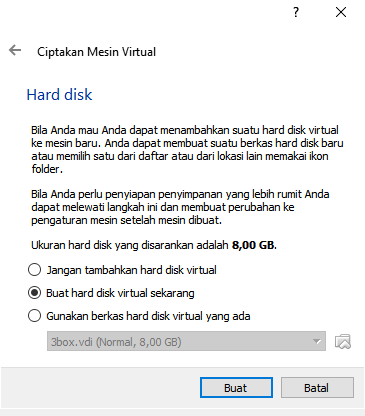
<blockquote class="tr_bq" style="text-align: justify;">
<span style="font-family: &quot;trebuchet ms&quot; , sans-serif;">Langkat selanjutnya adalah membuat harddisk virtual yang akan digunakan untuk menginstall sistem operasi dan program pada mesin virtual anda nantinya. Terdapat 3 opsi pengaturan yang bisa anda gunakan :</span></blockquote>
<blockquote class="tr_bq" style="text-align: justify;">
<span style="font-family: &quot;trebuchet ms&quot; , sans-serif;"><b>Do not add a virtual hard disk</b></span></blockquote>
<blockquote class="tr_bq" style="text-align: justify;">
<span style="font-family: &quot;trebuchet ms&quot; , sans-serif;">Opsi ini digunakan untuk tingkat mahir dimana hard disk virtual akan dibuat dalam pengaturan terpisah setelah pembuatan mesin virtual selesai.</span></blockquote>
<blockquote class="tr_bq" style="text-align: justify;">
<span style="font-family: &quot;trebuchet ms&quot; , sans-serif;"><b>Create a virtual hard disk now</b></span></blockquote>
<blockquote class="tr_bq" style="text-align: justify;">
<span style="font-family: &quot;trebuchet ms&quot; , sans-serif;">Opsi ini digunakan untuk membuat hard disk virtual baru bersamaan dengan pembuatan mesin vitual.</span></blockquote>
<blockquote class="tr_bq" style="text-align: justify;">
<span style="font-family: &quot;trebuchet ms&quot; , sans-serif;"><b>Use an existing virtual hard disk file</b></span></blockquote>
<blockquote class="tr_bq" style="text-align: justify;">
<span style="font-family: &quot;trebuchet ms&quot; , sans-serif;">Opsi ini digunakan untuk menggunakan hard disk virtual yang sudah pernah anda buat.</span></blockquote>
<div style="text-align: center;">
<div class="separator" style="clear: both; text-align: center;">
</div>
<br />
<blockquote class="tr_bq" style="text-align: justify;">
<span style="font-family: &quot;trebuchet ms&quot; , sans-serif;">Untuk saat ini karena anda belum memiliki hard disk vitual maka pilih Create a virtual hard disk now dan tekan Create.</span></blockquote>
<div style="text-align: justify;">
<span style="font-family: &quot;trebuchet ms&quot; , sans-serif;"><b>5. Pilih tipe file hard disk yang akan kita gunakan.</b></span></div>
<br />
<div style="text-align: center;">
<div class="separator" style="clear: both; text-align: center;">
</div>
<div style="text-align: justify;">
<span style="font-family: &quot;trebuchet ms&quot; , sans-serif;"><br /></span></div>
<blockquote class="tr_bq" style="text-align: justify;">
<span style="font-family: &quot;trebuchet ms&quot; , sans-serif;">Terdapat 3 tipe file hard disk yaitu :</span></blockquote>
<blockquote class="tr_bq" style="text-align: justify;">
<ul>
<li><span style="font-family: &quot;trebuchet ms&quot; , sans-serif;">VDI (Virtualbox Disk Image) adalah format native dari Virtual Box</span></li>
<li><span style="font-family: &quot;trebuchet ms&quot; , sans-serif;">VHD (Virtual Hard Disk) adalah format native dari Microsoft Virtual PC</span></li>
<li><span style="font-family: &quot;trebuchet ms&quot; , sans-serif;">VMDK (Virtual Machine Disk) adalah format native dari <a href="https://www.nesabamedia.com/pengertian-vmware/">VMWare</a></span></li>
</ul>
</blockquote>
<blockquote class="tr_bq" style="text-align: justify;">
<span style="font-family: &quot;trebuchet ms&quot; , sans-serif;">Jika anda tidak ingin menggunakannya untuk software virtualisasi lainnya pilih "VDI (VirtualBox Disk Image)". Kemudian pilih Next &gt;.</span></blockquote>
<div>
<div style="text-align: justify;">
<span style="font-family: &quot;trebuchet ms&quot; , sans-serif;"><b>6. Storage on Physical Hard Disk</b></span></div>
<blockquote class="tr_bq" style="text-align: justify;">
<span style="font-family: &quot;trebuchet ms&quot; , sans-serif;">Pada langkah selanjutnya anda akan diminta untuk memilih bagaimana virtual hard disk tersimpan pada hard disk fisik anda. Terdapat dua opsi pengaturan yaitu :</span></blockquote>
<blockquote class="tr_bq" style="text-align: justify;">
<span style="font-family: &quot;trebuchet ms&quot; , sans-serif;"><b>Dynamically Allocated</b></span></blockquote>
<blockquote class="tr_bq" style="text-align: justify;">
<span style="font-family: &quot;trebuchet ms&quot; , sans-serif;">Menggunakan kapasitas hard disk fisik berdasarkan jumlah hard disk virtual, tidak berdasarkan ukuran yang telah di tentukan.</span></blockquote>
<blockquote class="tr_bq" style="text-align: justify;">
<span style="font-family: &quot;trebuchet ms&quot; , sans-serif;"><b>Fixed Size</b></span></blockquote>
<blockquote class="tr_bq" style="text-align: justify;">
<span style="font-family: &quot;trebuchet ms&quot; , sans-serif;">kapasitas hard disk fisik yang digunakan berdasarkan kapasitas hard disk virtual yang dibuat.</span></blockquote>
<blockquote class="tr_bq" style="text-align: justify;">
<span style="font-family: &quot;trebuchet ms&quot; , sans-serif;">Pilih sesuai kebutuhan anda (direkomendasikan menggunakan Dynamically Allocated) dan kemudian pilih Next &gt;.</span></blockquote>
<div>
<div style="background-color: white; color: #666666; font-family: &quot;trebuchet ms&quot;, trebuchet, sans-serif; font-size: 13.2px; text-align: center;">
<div class="separator" style="clear: both; text-align: center;">
</div>
<div style="background-color: white; color: #666666; font-family: &quot;trebuchet ms&quot;, trebuchet, sans-serif; font-size: 13.2px;">
<br /></div>
<div style="text-align: justify;">
<span style="font-family: &quot;trebuchet ms&quot; , sans-serif;"><b>7. File Location And Size</b></span></div>
<blockquote class="tr_bq" style="text-align: justify;">
<span style="font-family: &quot;trebuchet ms&quot; , sans-serif;">Pada langkah terakhir adalah menentukan Lokasi &amp; Ukuran hard disk virtual anda. Silahkan atur sesuai dengan kebutuhan anda. Ada baiknya anda menyesuaikan dengan system requirement dari OS yang akan di install. Setelah selesai klik Create maka mesin virtual anda telah berhasil dibuat.</span></blockquote>
<div style="background-color: white; color: #666666; font-family: &quot;trebuchet ms&quot;, trebuchet, sans-serif; font-size: 13.2px; text-align: center;">
<div class="separator" style="clear: both; text-align: center;">
</div>
<div style="background-color: white; color: #666666; font-family: &quot;trebuchet ms&quot;, trebuchet, sans-serif; font-size: 13.2px;">
<br /></div>
<div style="background-color: white; color: #666666; font-family: &quot;trebuchet ms&quot;, trebuchet, sans-serif; font-size: 13.2px;">
<br /></div>
<div style="background-color: white; color: #666666; font-family: &quot;trebuchet ms&quot;, trebuchet, sans-serif; font-size: 13.2px;">
<b style="color: black; font-family: &quot;trebuchet ms&quot;, sans-serif; font-size: medium;">V. PERTANYAAN</b></div>
<blockquote class="tr_bq" style="text-align: justify;">
<span style="font-family: &quot;trebuchet ms&quot; , sans-serif;">1 Apa fungsi Tombol NEW pada Oracle VM VitualBox Manager ?</span></blockquote>
<blockquote class="tr_bq" style="text-align: justify;">
<span style="font-family: &quot;trebuchet ms&quot; , sans-serif;">2 Pada jendela Create Virtual Machine, tuliskan type dan version yang akan digunakan dalam Praktek</span></blockquote>
<blockquote class="tr_bq" style="text-align: justify;">
<span style="font-family: &quot;trebuchet ms&quot; , sans-serif;">3 Sebutkan dampak mengalokasikan ukuran RAM pada Virtual Machine  yang semakin besar !</span></blockquote>
<blockquote class="tr_bq" style="text-align: justify;">
<span style="font-family: &quot;trebuchet ms&quot; , sans-serif;">4 Sebutkan 3 opsi pengaturan yang digunakan untuk membuat harddisk virtual ketika menginstal sistem operasi dan program pada mesin virtual</span></blockquote>
<blockquote class="tr_bq" style="text-align: justify;">
<span style="font-family: &quot;trebuchet ms&quot; , sans-serif;">5 Jelaskan pilihan berikut ini : Do not add a virtual harddisk !</span></blockquote>
<blockquote class="tr_bq" style="text-align: justify;">
<span style="font-family: &quot;trebuchet ms&quot; , sans-serif;">6 Jelaskan pilihan berikut ini : Create a virtual harddisk now !</span></blockquote>
<blockquote class="tr_bq" style="text-align: justify;">
<span style="font-family: &quot;trebuchet ms&quot; , sans-serif;">7 Jelaskan pilihan berikut ini : Use an existing virtual hard disk file !</span></blockquote>
<blockquote class="tr_bq" style="text-align: justify;">
<span style="font-family: &quot;trebuchet ms&quot; , sans-serif;">8 Jelaskan pilihan berikut ini : VDI (Virtualbox Disk Image)</span></blockquote>
<blockquote class="tr_bq" style="text-align: justify;">
<span style="font-family: &quot;trebuchet ms&quot; , sans-serif;">9 Jelaskan pilihan berikut ini : VHD (Virtual Hard Disk)</span></blockquote>
<blockquote class="tr_bq" style="text-align: justify;">
<span style="font-family: &quot;trebuchet ms&quot; , sans-serif;">10 Jelaskan pilihan berikut  ini : VMDK (Virtual Machine Disk)</span></blockquote>
<div style="background-color: white; color: #666666; font-family: &quot;trebuchet ms&quot;, trebuchet, sans-serif; font-size: 13.2px;">
<span style="background-color: transparent; font-family: &quot;trebuchet ms&quot; , sans-serif;"><br /></span></div>
<div style="background-color: white; color: #666666; font-family: &quot;trebuchet ms&quot;, trebuchet, sans-serif; font-size: 13.2px;">
<b style="color: black; font-family: &quot;trebuchet ms&quot;, sans-serif; font-size: medium;">VI. JAWABAN PERTANYAAN</b></div>
<div style="background-color: white; color: #666666; font-family: &quot;trebuchet ms&quot;, trebuchet, sans-serif; font-size: 13.2px;">
<b style="color: black; font-family: &quot;trebuchet ms&quot;, sans-serif; font-size: medium;"><br /></b></div>
<div style="background-color: white; color: #666666; font-family: &quot;trebuchet ms&quot;, trebuchet, sans-serif; font-size: 13.2px;">
<b style="color: black; font-family: &quot;trebuchet ms&quot;, sans-serif; font-size: medium;"><br /></b></div>
<div style="background-color: white; color: #666666; font-family: &quot;trebuchet ms&quot;, trebuchet, sans-serif; font-size: 13.2px;">
<b style="color: black; font-family: &quot;trebuchet ms&quot;, sans-serif; font-size: medium;"><br /></b></div>
<div style="background-color: white; color: #666666; font-family: &quot;trebuchet ms&quot;, trebuchet, sans-serif; font-size: 13.2px;">
<b style="color: black; font-family: &quot;trebuchet ms&quot;, sans-serif; font-size: medium;"><br /></b></div>
<div style="background-color: white; color: #666666; font-family: &quot;trebuchet ms&quot;, trebuchet, sans-serif; font-size: 13.2px;">
<b style="color: black; font-family: &quot;trebuchet ms&quot;, sans-serif; font-size: medium;"><br /></b></div>
<div style="background-color: white; color: #666666; font-family: &quot;trebuchet ms&quot;, trebuchet, sans-serif; font-size: 13.2px;">
<b></b></div>
</div>
</div>
</div>
</div>